






In high-power CATV and PON RF Overlay systems, the fiber end-face is the most vulnerable point in the entire optical path. When an EDFA/EYDFA (High Power EDFA) output port suddenly registers a power drop—falling, for instance, from a rated +20dBm to a mere +14dBm—the internal hardware is rarely at fault. Instead, the culprit is almost always Fiber Connector End-face Damage. This is not a manufacturing defect, but a permanent physical destruction of the port’s connection point caused by improper operational habits.
If a technician handles these connectors while EDFA works at full power, such as 21dBm, they risk burning a physical hole into the glass surface, rendering that specific port useless for high-quality transmission.

Figure 1: Microscopic view of fiber connector end-face damage caused by improper mating at high power.
The Cause: Operational Error During High-Power Mating
The damage occurs due to a specific operational error: **Inserting or removing the fiber connector while the laser is outputting high power (e.g., 18-20dBm).** It is vital to understand that this has nothing to do with electrical “hot-plugging”; it is about Optical Energy Density.
At +20dBm, the infrared light is concentrated into a 9-micron core. During the split second of mating (connecting) or unmating (disconnecting), a microscopic air gap exists. If the laser is active at full power, this energy can ignite dust particles or cause a thermal arc that pits the glass end-face. Once the hole is burnt into the surface, light scatters, and the port’s output power drops permanently.
Technician Habits: The Biggest Threat to Your Network
The real-world pain point for network operators is the human factor. Technicians often ignore safety protocols for a few common reasons:
- Old Habits from Low-Power Systems: Technicians used to standard GPON or low-power telecom links (-3dBm to +3dBm) are accustomed to plugging and unplugging fiber without any issues. They carry this dangerous habit into high-power EDFA environments.
- Rushing the Installation: Lowering the pump laser power via the Web or SNMP interface takes time. To save a minute, installers often skip this step and “hot-mate” the connectors at full power.
- Lazy Maintenance: Even when warned, some personnel assume that if the port looks clean, it is safe to swap live. Physics proves otherwise; at 20dBm, even “clean” mating is risky.
Troubleshooting: Port Damage vs. Splitter Failure
According to the Premlink EDFA Troubleshooting Guide, you can easily diagnose if your port has been destroyed by an operational error:
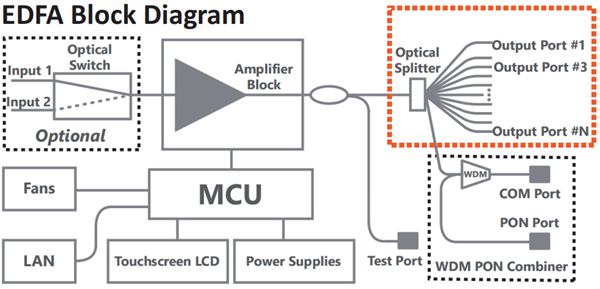
- The Individual Port Drop: If only Port 31 shows a power loss while Port 30 and 32 are normal, your internal splitter is GOOD. The end-face of Port 31 has likely been burnt through due to improper handling. (fiber connector end-face damage on port 31)
- The Group Failure: If a block of 8 ports (e.g., 25-32) all drop power at once, the problem is an internal 1×32 optical splitter failure, which requires factory service.
The Mandatory Safety Protocols: 15dBm Rule vs. Offline Maintenance
To stop destroying EDFA ports and ensure technician safety, every maintenance team must adhere to strict handling protocols. There are two approved methods for interacting with optical connectors, depending on whether the network must remain live or can be taken offline.
Option A: Live Maintenance (The 15dBm Rule)
If the EDFA must continue transmitting content to subscribers during maintenance, you cannot power down the unit. In this scenario, you must reduce the risk of end-face damage by lowering the energy density.
Step 1: Attenuate Output Power. Use the management software (Web/SNMP) to reduce the port output to 15dBm or lower. This allows the EDFA to continue working while bringing the optical energy down to a level where the risk of “burn-through” during mating is significantly minimized.
Step 2: Clean and Mate. Use a high-quality dry cleaning tool on the connector. Secure the connection fully until it locks. WARNING: Never use an optical microscope to inspect a port while the EDFA is powered on or the laser is active. High-intensity infrared light can cause immediate and permanent eye injury.
Step 3: Restore Operational Power. Once the physical connection is locked and stable, ramp the power back up to the required +20dBm+ level via the software.
Option B: Offline Maintenance (The Safest Mode)
If the network window allows for a brief service interruption, this is the most secure method for both the equipment and the technician.
Step 1: PUMP OFF or POWER OFF. Disable the pump laser through the management interface or turn the main power switch to the OFF position. This ensures zero optical output.
Step 2: Safe Inspection. Only when the laser is completely OFF is it safe to use a digital microscope to inspect the port for contaminants or existing fiber connector end-face damage.
Step 3: Clean, Mate, and Restart. Clean the interface, secure the mating, and then re-enable the pump or main power. This “Cold-Mating” process is the only way to 100% guarantee that no thermal arcing or pitting occurs.
FAQ: Protecting Your Fiber Interface
Q: Is the damaged port repairable?
A: Not by cleaning. Fiber connector end-face damage is a physical alteration of the silica—a “burnt” hole. You must open the EDFA, cut off the damaged internal pigtail, and splice on a new high-power connector.
Q: Does this happen every time I plug in at 20dBm?
A: Not every time, but the risk of fiber connector end-face damage on EDDFA is very high. It depends on cleanliness and the angle of insertion. It is a gamble that eventually results in a ruined port and network downtime.
Q: Why does a burnt port affect signal quality?
A: The burnt hole causes Optical Return Loss (ORL) and scatters the light. This increases noise in the link, degrading both CNR and Modulation Error Ratio (MER) for the subscribers connected to that port.
Q: Can I use an optical power meter to verify a burnt port?
A: Yes. If you suspect damage, connect a known good patch cord to a power meter. If the reading is significantly lower than the GUI-reported power (e.g., a 5-6dB drop), and other ports are fine, the end-face is definitely damaged.
Conclusion
Fiber Connector End-face Damage is 100% preventable. It is the direct result of technicians choosing speed over safety. By enforcing the 15dBm rule and eliminating the habit of “hot-mating” fiber at high power, you can save your Premlink equipment from unnecessary damage and ensure your network stays operational.