






In high-performance HFC and FTTH networks, keeping a strong optical budget is non-negotiable. Among the various control logics of optical amplifiers, EDFA APC Mode (Automatic Power Control) stands out as the industry standard for ensuring consistent 1550nm downstream delivery, regardless of environmental variables.
Understanding EDFA APC Mode Logic
APC (Automatic Power Control) is a complex closed-loop feedback system. Unlike ACC (current control) which only locks the drive current, the EDFA APC mode prioritizes the actual measured output power at the fiber port.
- Constant Output: The APC logic automatically adjusts the pump laser diode to keep your target dBm level, no matter if the input signal from your 1550nm transmitter drifts or the temperature in the cabinet changes.
- Internal Sensing: High-precision photodetectors monitor the output in real-time, feeding data back to the CPU to prevent signal clipping or drop-offs.
Configuration Guide: Setting Up APC on the PL2000x Series
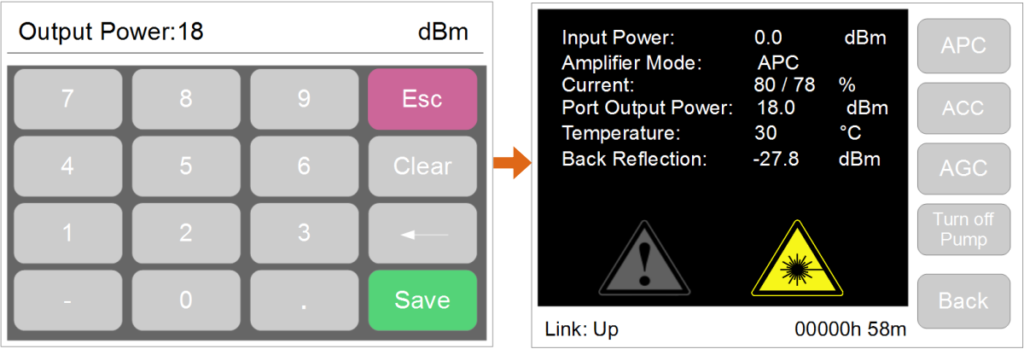
The Premlink PL2000x CATV EDFA is pre-configured to APC mode by default, as it offers the most user-friendly experience for network technicians. To customize your output power, please follow these steps via the touchscreen interface:

- Enter Setup: From the LCD main menu, tap the “Setup” icon.
- Select Mode: Ensure the “APC” button is highlighted. This confirms the system is tracking power, not just current.
- Input Power Value: Tap the “Port Output Power” field. A touch keyboard will appear, allowing you to enter your specific dBm requirement.
- Save & Monitor: Hit save. The top of the menu will now reflect the real-time adjusted output.
Adjustable Range: Balancing Your Optical Link
One of the most powerful features of the CATV EDFA APC mode in the PL2000x series is the ability to fine-tune levels without hardware changes. The system allows for a flexible adjustment range: -10dB to +0.5dB relative to the factory nominal output.
| Rated Power per Port | Min. APC Adjustment (-10dB) | Max. APC Adjustment (+0.5dB) |
|---|---|---|
| 17 dBm | 7.0 dBm | 17.5 dBm |
| 19 dBm | 9.0 dBm | 19.5 dBm |
| 22 dBm | 12.0 dBm | 22.5 dBm |
Pro-Tips for APC Management
1. The “Mute” Function: If you need to perform emergency fiber splicing downstream, you can set the APC value to “0” and save. This effectively turns the output to zero without powering down the entire unit.
2. Maximum Power Threshold: To protect the pump laser’s MTBF (Mean Time Between Failures), the PL2000x will ignore any input value that exceeds the hardware’s physical maximum output capacity.
FAQ: Common Questions on EDFA APC Mode
Q1: Does APC mode protect against “thermal runaway”?
A: Yes. Because APC monitors the actual output, it can sense if a laser is struggling due to heat and will trigger an alarm (via SNMP or LCD) if the target power cannot be safely maintained.
Q2: Is APC mode better than AGC for a single-stage EDFA?
A: For most CATV distribution points, APC mode is superior because it ensures that the optical receivers (ONUs) always receive the exact dBm they were balanced for, maintaining consistent CNR (Carrier-to-Noise Ratio).
Q3: What happens if the input fiber is disconnected in EDFA APC mode?
A: The system will detect the loss of input and, for safety reasons, will typically drop the pump power to avoid damaging the EDFA’s internal components or causing eye-safety hazards.
Looking for a high-density solution? Check the PL2000x High Power EDFA Specs or learn about the differences between ACC and AGC Modes.