






Touch Screen EDFA vs. Physical Buttons EDFA: In the world of high-capacity broadband and HFC networks, the EDFA (Erbium-Doped Fiber Amplifier) is the heart of the transmission system. For decades, the “standard” way to interact with these machines was through small, monochromatic LED characters and a set of clunky physical push-buttons.
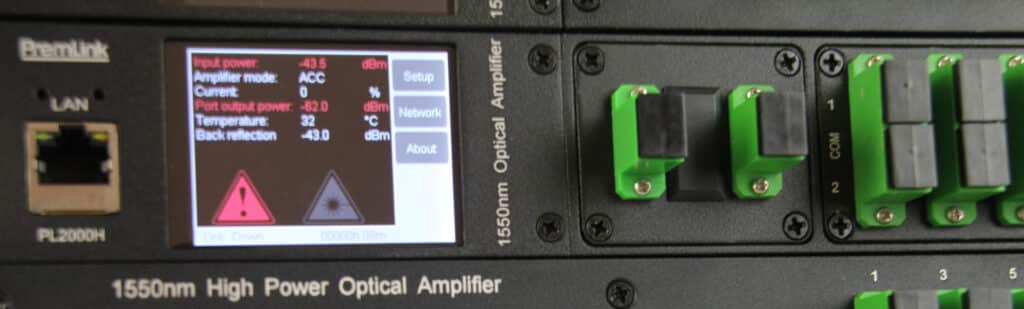
In 2015, while the industry was still clicking away at manual buttons, Premlink made a strategic engineering decision: We moved entirely to Touch Screen EDFA. Today, we look back at ten years of field data, tens of thousands of units deployed, and a clear shift in user preference. If you are still using push-button EDFAs, here is why your next upgrade should be touch-driven.
1. The “3-Second Rule”: Touch Screen EDFA Efficiency in Field Operations
The most significant advantage of a touch screen isn’t just “looking modern”—it’s about operational velocity.
Consider a standard scenario: You are deploying a Premlink PL2000A High Power EDFA. The unit has a factory default output of 21dBm, but your specific link budget requires it to run at 15dBm.
- The Traditional EDFA: You enter the menu, find the Power Setting, and start clicking a “Down” arrow. If the step-down is 0.1dBm or 0.5dBm, you might have to press that button 30 times. If you accidentally press it too fast and hit 17dBm, you have to find the “Up” button and click back. It’s tedious, prone to manual error, and honestly, frustrating in a high-pressure data center environment.
- The Premlink Touch Screen EDFA You tap the APC (Automatic Power Control) mode on the 3.5” or 2.4” screen. A digital keypad pops up. You type “18”, hit SAVE, and the internal microprocessor adjusts the pump laser current instantly.
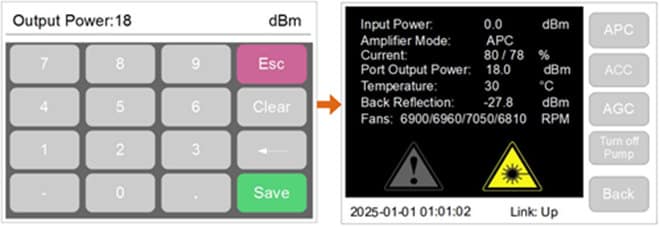
What takes 60 seconds of clicking on a competitor’s machine takes 3 seconds on a Premlink EDFA. When you are managing a rack full of amplifiers, these seconds add up to significant labor savings.
2. Network Configuration — Setting IPs in Seconds
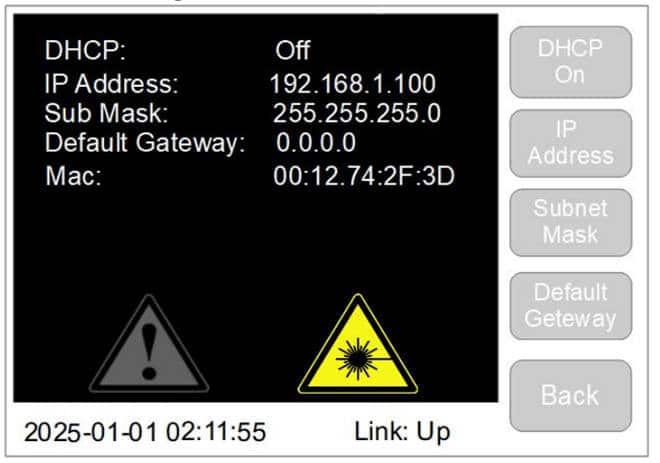
Beyond power adjustment, network configuration is another area where touch screens shine. Setting an IP address (e.g., 192.168.1.100) on a traditional EDFA is a notorious headache for field engineers.
- The Traditional EDFA: Since there are only a few functional buttons, you have to scroll through digits 0-9 for each of the 12 positions in an IP address. You click once for ‘1’, scroll to ‘9’, click to the next segment… if you miss a digit, you often have to cycle through the entire 0-9 sequence again. It is a tedious, error-prone process that turns a simple task into a 5-minute ordeal.
- The Premlink Touch Screen EDFA: Our UI features a dedicated networking menu with a full numeric keypad. You simply tap the address fields and type the IP exactly like you would on a smartphone. Setting a static IP, Subnet Mask, and Gateway takes less than 10 seconds.
3. Hardware Precision: 2U and 1U Configurations
There isn’t a “one size fits all” way to build an interface. At Premlink, we made the most of the screen space based on the size of the chassis:
- For 2U Chassis: We utilize a 3.5” 480 x 320 Color Touch Screen. There is considerable room for complicated monitoring graphs and big input keys.
- For 1U Chassis: We utilize a 2.4” 320 x 240 Color Touch Screen. The resolution is good enough to make sure that text is easy to see and touch is accurate, even in a tiny 1RU.
4. Beyond Input: The Power of Visual Intelligence
Traditional LED displays are “blind.” They can show you numbers, but they can’t show you status at a glance.
A color touch screen EDFA allows for Visual Alarming. On a Premlink display, we use color coding to communicate urgency:
- Green: Normal operation.
- Yellow/Orange: Warning (e.g., input power slightly out of range).
- Red: Critical Alarm (e.g., fan failure or pump over-temperature).
5. Addressing the “Reliability” Myth
As a manufacturer with 10 years of specific data on this topic, our answer is a firm No to screen failure concerns. Since 2015, we have shipped tens of thousands of touch screen EDFAs worldwide. The failure rate of our touch panels is negligible—literally a few cases in ten years.
- High-Temperature Stability: Designed to operate perfectly in the ambient heat of a fully loaded rack.
- Longevity: Rated for millions of touches—far more than the life cycle of the laser itself.
FAQ: Common Questions About Touch Screen EDFA
Q1: Can I still operate the touch screen EDFA if I am wearing gloves?
Yes. Our screens are calibrated for industrial sensitivity. Our industrial panels are responsive to slight pressure, making them workable in various field conditions.
Q2: Is the screen bright enough to read in a bright room?
Absolutely. We use high-backlight LCDs with a wide viewing angle. The text remains crisp and readable.
Q3: What happens to the laser output if the screen is damaged?
The screen is the interface layer. The internal microprocessor operates independently. The touch screen EDFA will continue to amplify the signal based on its last saved settings.